
After writing about the IE Factor several days ago, I thought I’d detail a specific example which had me pulling out my hair last week. I’ll also provide the solution I came up with. As I stated Monday:
Tweaks that should have worked had no effect, prompting me to try things that made absolutely no sense to try.
This bug was no exception. It took a lot of isolating and trying remote possibilities to come up with the solution that fixed it. I also mentioned different combinations of IE’s can drive a CSS author mad. This bug shows up in IE5.5, but not in IE5.0 (Win). IE5.5 certainly renders CSS a little better than its predecessor, but with IE5.5’s release and improvements, new bugs — which did not previously exist in IE5.0 — suddenly appeared. Some of those same bugs were carried into IE6.0.
The problem: A simple series of content boxes (I call them “modules”) appearing in succession within a 200-pixel wide sidebar. Nothing out of the ordinary, certainly nothing complex. Each module started with a title marked up with the <h2> tag. Each module’s title was followed by two generic paragraphs of text.
The example file I’ll provide is stripped down, with almost all design details removed. Titles were given a bit of style to reduce font size and top and bottom margins. For what I was creating, borders for each module only existed on the sides. I’ve exaggerated them to make this bug more obvious. To see it misbehaving, view this example of the bug in IE5.5 or IE6.0, then view it in any other browser to see the correct behavior. For those not fortunate enough to have either of those two Windows browsers, here’s a screenshot of the first and last modules, as rendered by IE6.0:
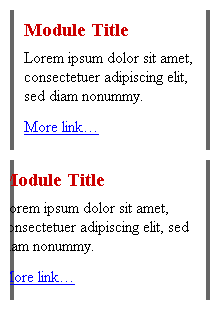
Notice how the text gradually slips further to the left for each module. The bug only begins to appear in the second module, then gets progressively worse for each module below. Until the last module’s text slips so far to the left, it gets clipped by the module’s container. The problem gets infinitely worse as more modules are added. No other browsers have problems rendering the text correctly.
Obviously, this problem wasn’t acceptable. I had no idea how many modules the client might need to stack together in the sidebar. I tried every trick in the book I knew to prevent the text from slowly slipping over. The problem was seemingly incomprehensible, as each module was completely independent of the next. The code was completely valid, and no containers overlapped each other. I tried it with the 200-pixel sidebar, and without. I removed padding, applied margins, removed the titles. No luck.
I walked away, went to lunch, then came back to find the root of the problem. I discovered the text was slipping to the left by four pixels from one module to the next. At the time, each of my side borders were only 2-pixels wide. So the text slippage between each module was equivalent to the width of left and right borders combined. I removed the side borders, the bug disappeared. (See example)
Ok, so it was the border. But the effect I was going for required the side borders. At one point I tried adding top and bottom borders to the module: Bam! problem solved. Turns out it’s actually the presence of a bottom border (any width) which fixes the bug. It makes no sense why a missing bottom border on one element would affect another element on the page. But in IE5.5/6.0, it does.
So the bug could ultimately be described as this: If left and right borders are applied to one container element without a bottom border, the side borders on the first container will adversely affect the text position in the next successive container element.
To fix my instance of the problem, I added a 1-pixel bottom border for each module, making it the same color as the module background to keep it mostly invisible. (In the example, background and bottom border are white.) Since the border isn’t necessary in all other browsers, I really didn’t want it there when it wasn’t needed. So I added one more rule to turn off the bottom border for them:
.module {
margin:0 0 15px;
border:4px solid #666;
border-width:0 4px;
border-bottom:1px solid #fff;
padding:2px 10px;
}
html>body .module {
border-bottom-width:0;
}
By using a child selector, that final zero-width border rule is hidden from all versions of IE/Win. (View the final solution) I also discovered that applying a width to each module also solves the text-slippage problem. But IE5/Win’s broken box model needs to be dealt with if the modules use left or right padding. And widths should not be necessary for individual modules, given that a width is already specified for the parent #sidebar. So I stuck with the add/remove bottom border trick to avoid the need to re-specify module widths.
This is just one example of the inexplicable bugs which caused delay for my latest project. If anyone else encounters the same bug, hopefully this example will save some of their hair, and prevent them from facing the same frustration.
27 comments (Comments closed)
I actually ran into this same bug on a design I was doing a month ago. I was trying to apply left and right borders to blockquotes and had the same result you did. I gave up on finding a solution at the time and just dropped the feature, but I’m glad you were more persistent than I. Thanks for the tip.
Try taking the padding out of
.moduleThen add margin to the other elements… I just added a 5px left/right margin to and
simply fixed…
Once you add border to the .module and add padding, you seem to be playing with the IE box model bug.
I originally thought I might be seeing a unique instance of the bug, and that no one else would encounter it. But it seems to show up whenever side borders are applied without a bottom border. Doesn’t matter how the next element is styled, unless explicit widths are used to force IE to behave.
There seems to be no end to IE’s bizzare behavior. I remember a similarly hair-pulling experience wherein I could not get IE to apply rules on the following selector:
#menu a:hover img {Given that IE does support the :hover pseudoclass on the a element, I could not figure out why the above selector would not work. After much wailing and gnashing of teeth, I figured out that adding a new rule for a selector that ended on the a:hover magically made the above rule start working:
#menu a:hover { /*any-rule*/ }I haven’t the faintest idea why this worked, but now it’s just another IE hacksaw in the toolbox when I tackle a new project…
Problems like these are so frustrating because they have no logical basis for existing, and therefore rarely have a solution that could be arrived at by logical reasoning. Workarounds can only be found by trial-and-error, which is a highly inefficient and time-consuming way to develop.
We owe a lot to Doug and other developers who take the time to track down solutions and share them with the community at large.
Thanks guys (and gals)!
You could have also applied a 1px high background image (repeat-y) with two pixels of your border color on either side to your module style and skipped the borders entirely.
Of course the point you’re making here is a that workaround shouldn’t be necessary and that these are the issues we’ll be faced in the coming years.
Jon-Paul: Thanks for the suggestion. I quickly tried it and added another example file: index_nopadding.html.
The solution works, as long as all padding is removed from
.module, including top and bottom padding. Weird, eh?As I note in the example file, this solution might not always be ideal if left and right margins need to be applied to every element inside
.module, just to push them away from the module’s borders. Some instances might not work with left or right margins. But a good possible alternative, nonetheless.I remember on one of my older designs I wanted a container div with a 2px border on all four sides. For some reason, the design fell apart in IE whenever a top-border was styled. I tried using a 2px background gif with x-repeat, but even that would cause the style to break. Wierdest bug I’ve ever seen so I simply published the design without a top-border.
My current homepage has h2’s styled with a background color and borders. The result is a nice box around the text. IE mis-handles this of course. At first I thought it simply wasn’t displaying it. Now I see that it’s actually misplacing the boxes (border and background). So about 30px below the h2 (well into a paragraph) you would see a colored rectangle the same width and height as the h2, just floating around.
Just wierd…
I actually published a rant hoping a substantial percentage of my audience would switch to firebird/mozilla/opera/whatever. I think I got two of my friends. :)
Thanks alot for posting this. I’m sure it will save someone (including me) some head scratching.
One question though, since you are using an unclassed h2 element as your hook for the title, do you run a risk of unintended styling if he user places an h2 element in the content of the module? Why not give the h2 a class instead?
Module Title
Magik Creeping Text is an additional source of information on this and other CSS-related browser bugs.
David: Right, should have known John and Holly would have this IE bug covered too. They’ve documented quite a few of them. Thanks.
I had the same exact problem with a skin I was designing for another site. Although I couldn’t tell you what my problem was, I do know that it fixed itself with adding the bottom border with the same color as the background. Now I know “WHY” and it will save me several hours trying to figure out where and why in the future!
I had this exact same problem several months ago and ended up scrapping the entire design because of it and spending a good hour convincing the client that the new design was better anyway.
This solution is genius! Thank you for letting us all in on the process.
It appears to only be related to bottom padding when there is a left border but no bottom border. I tried all the combinations and thats the one that fails.
Doug, your example has a left border, a bottom padding, no bottom border, and a block element nested inside. Those are the triggers of this bug, and that bottom border cures the bug.
BTW, Eric Meyer happens to have a mild case of this bug on one of his pages. Shhhh…
Doug,
Thank you sooooo much for the post and the solution! We’ve developed an ASP.NET application and saw this same nasty bug but couldn’t figure it out (it’s still there: http://demo.custfeedback.com/).
Again, thanks!
Milan
Yet another strange IE behavior, that I’m dealing with at the moment.
I have a definition list where I have made a 1px graphic line gif, that I use as background on the dt’s like this:
background: url(line.gif) bottom left no-repeat;But for some reason it does not show up on the first dt — so I have to add an empty dt and a dd with a nbsp inside it in the begining of the list to make the rest look like it should!
Can’t seem to find another solution at the moment…
Thanks for the example - a very similar problem with padding was causing IE to arbitrarily insert half-page spaces in a column of images… nuking the padding fixed it. w00t.
On the plus side, as its security flaws become significantly obviously heinous with every turn, many corporations are taking long, hard looks at Excrement Exploder and wondering why they persist in using it.
Uh - uh - one more, while I’m at it:
I wanted to have two consecutive ul’s with the li’s displayed as block with fixed width and
float: left.For some reason IE put a vertical space between the ul’s, even thou all margins and padding were set to zero.
I tried removing all whitespaces between the tags, but nothing helped. Until I placed some charecters just after the > of the first ul… !? Then the space disapeared!
Until I read this article, I wasn’t even aware that you were supposed to be able to specify top and bottom padding together, along with the L & R padding together. I’ve checked the W3C specs, and yes, IE isn’t compliant. Luckily for me, I’ve always been in the habbit of specifying all four attributes, so my class would have looked like:
.module {
margin: 0px 0px 15px 0px;
border:4px solid #666;
border-width: 0px 4px 0px 4px;
padding: 2px 10px 2px 10px;
}
which works fine in all browsers without any hacks.
Thanks for the explanation and bug fix. I have been trying to get Explorer to display one design properly, but it messed it up. Never mind. Now I know how to fix it.
Hi. Thank you for your detailed explanation and examples. Rather than using a border the same color as the background, why not simply specify the color as transparent?
So, the altered line from your solution would then be:
border-bottom:1px solid transparent;
If you have to hack, somehow it seems a bit less “evil” a hack to me this way. ;)
There is a bulletproof way to create stylesheets that you know will only be applied to the version of IE you want to target. The technique involves using conditional comments to include stylesheets.
By eliminating this need to look for a hack that applies to a certain version of IE, you can hopefully make the IE factor a bit smaller.
A more detailed howto is available in Hack-free CSS for IE.
Thankyoooooooooou! Believe it or not I was going mad with this bug just last night on a client template job. I had pretty much given up, and was idly browsing Stopdesign.com today waiting for something to download, and I came across this piece. Talk about serendipity :-)
Thank U for your detailed explanation and examples. Until I read this article, I’ve been trying to get Explorer to display one design properly, but it messed it up.
Travis,
IE of course is not able to display transparent borders, even IE 6. They will become black instead… how could you even think of it ;-)
Ug, it’s so unfair that IE holds major market share and releases updates the least often…When it finally does support CSS properly, there will be much rejoicing.
That’s spot on, I have been developing a property site which repeats the results of a property search, the thumbnail images were shifting 1 pixel to the left each row, it’s taken me 5 hours so far… FINALLY, a solution, Thanks, you rock!!
Comments no longer open for this entry.